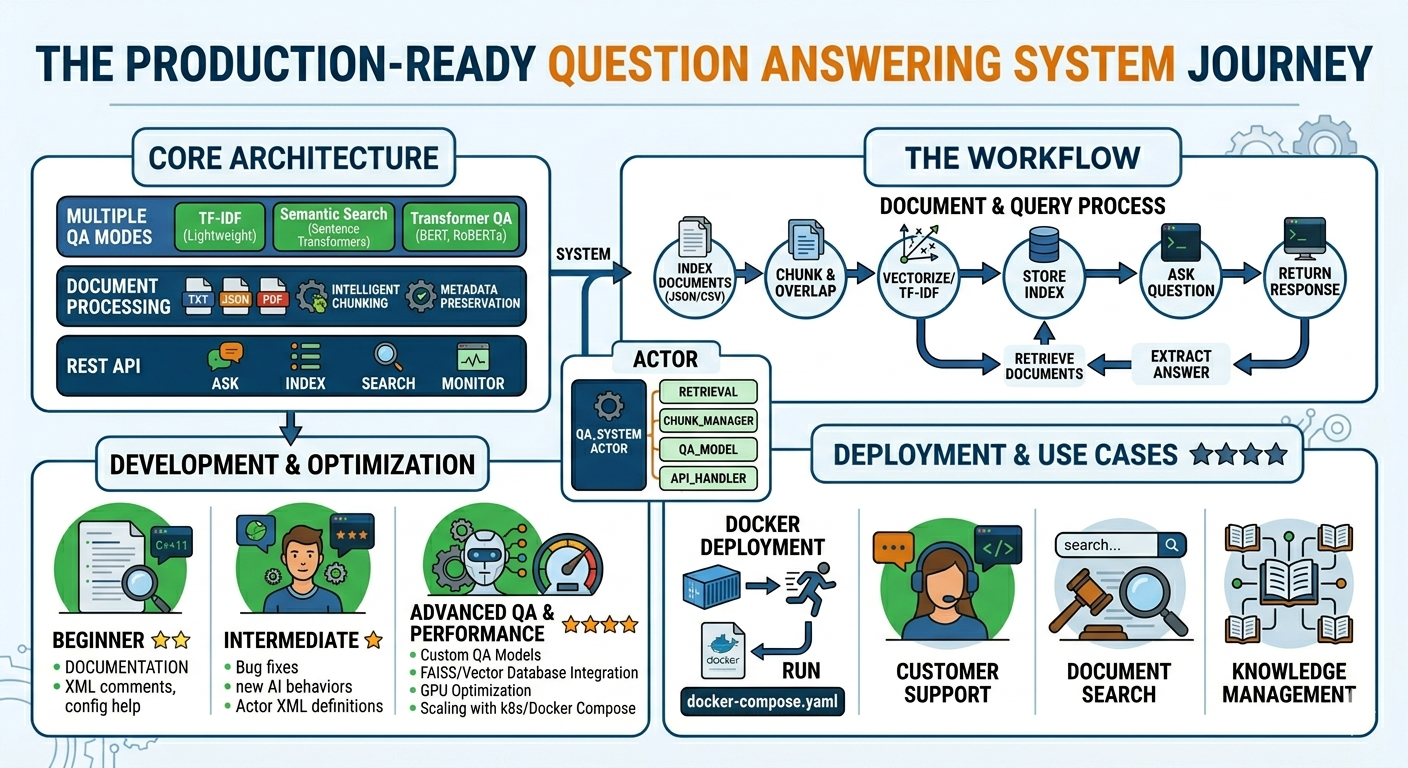
A production-ready, extensible Question Answering system with multiple retrieval strategies, REST API, and comprehensive documentation.
🌟 Features
- Multiple QA Modes
- TF-IDF based retrieval (fast, lightweight)
- Semantic search with sentence transformers
- Transformer-based QA models (BERT, RoBERTa)
- Document Processing
- Support for TXT, JSON, PDF, CSV files
- Intelligent text chunking with overlap
- Metadata preservation
- REST API
- Ask questions via HTTP
- Index documents dynamically
- Search and retrieve documents
- System health monitoring
- Production Ready
- Comprehensive test suite
- Performance optimization
- Docker support
- Configurable settings
📋 Table of Contents
- Installation
- Quick Start
- Usage Examples
- API Documentation
- Configuration
- Testing
- Deployment
- Performance
- Contributing
🚀 Installation
Basic Installation
bash
# Install core dependencies
pip install -r requirements.txt
Minimal Installation (TF-IDF only)
bash
pip install numpy scikit-learn flask flask-corsFull Installation (All features)
bash
# Install with semantic search
pip install sentence-transformers torch

# Install with transformer QA
pip install transformers torch

# Install PDF support
pip install PyPDF2
⚡ Quick Start
1. Run Basic Example
python
from qa_system import QuestionAnsweringSystem

# Initialize
qa = QuestionAnsweringSystem(mode="tfidf")

# Add documents
documents = [
    {
        "id": "doc1",
        "text": "Python is a programming language created by Guido van Rossum in 1991.",
        "metadata": {"category": "programming"}
    }
]

qa.add_documents(documents)
qa.index_documents()

# Ask questions
answers = qa.answer("Who created Python?")
print(answers[0].text)
2. Start API Server
bash
# Basic server
python api_server.py

# With pre-loaded documents
python api_server.py --docs sample_documents.json

# Advanced mode
python api_server.py --mode semantic --docs sample_documents.json
3. Index Documents
bash
# Index files from directory
python document_indexer.py --input ./my_docs --output index.json

# Index single file
python document_indexer.py --input document.pdf --output index.json
📖 Usage Examples
Example 1: Custom Documents
python
from qa_system import QuestionAnsweringSystem

qa = QuestionAnsweringSystem(mode="tfidf")

# Your documents
docs = [
    {"id": "1", "text": "Company XYZ was founded in 2010..."},
    {"id": "2", "text": "Our products include..."}
]

qa.add_documents(docs)
qa.index_documents()

# Get answer
answer = qa.answer("When was the company founded?")
print(f"Answer: {answer[0].text}")
print(f"Confidence: {answer[0].confidence:.2%}")
Example 2: Multiple Answers
python
# Get ranked answer candidates
answers = qa.answer(
    question="What are the main products?",
    top_k=5,
    return_multiple=True
)

for i, ans in enumerate(answers, 1):
    print(f"{i}. {ans.text} (confidence: {ans.confidence:.2%})")
Example 3: Document Search
python
# Retrieve relevant documents without extracting answers
results = qa.retrieve_documents("machine learning", top_k=3)

for doc, score in results:
    print(f"Document: {doc.id}")
    print(f"Score: {score:.4f}")
    print(f"Text: {doc.text[:100]}...\n")
Example 4: Save and Load
python
# Save trained system
qa.save("my_qa_system.pkl")

# Load later
qa = QuestionAnsweringSystem.load("my_qa_system.pkl")
🔌 API Documentation
Endpoints
POST /ask
Ask a question and get answers.
Request:
json
{
  "question": "What is Python?",
  "top_k": 3,
  "return_multiple": false
}
Response:
json
{
  "question": "What is Python?",
  "answers": [
    {
      "text": "Python is a programming language...",
      "confidence": 0.92,
      "source": "doc1",
      "context": "..."
    }
  ]
}
POST /index
Index new documents.
Request:
json
{
  "documents": [
    {
      "id": "doc1",
      "text": "Document content...",
      "metadata": {}
    }
  ]
}
POST /search
Search for relevant documents.
Request:
json
{
  "query": "machine learning",
  "top_k": 5
}
GET /health
Check system health.
GET /stats
Get system statistics.
Example API Usage
python
import requests

# Ask question
response = requests.post(
    "http://localhost:5000/ask",
    json={"question": "What is Python?"}
)
print(response.json())

# Index documents
requests.post(
    "http://localhost:5000/index",
    json={"documents": [{"id": "1", "text": "..."}]}
)
⚙️ Configuration
Edit config.py to customize:
python
QA_CONFIG = {
    'default_mode': 'tfidf',  # or 'semantic', 'transformer'
    'top_k_documents': 3,
    'min_confidence': 0.3,
    'chunk_size': 500,
    'chunk_overlap': 50,
}
Or use environment variables:
bash
export QA_MODE=semantic
export TOP_K=5
export CHUNK_SIZE=300
python api_server.py
🧪 Testing
Run the test suite:
bash
# Run all tests
pytest test_qa.py -v

# Run with coverage
pytest test_qa.py --cov=qa_system --cov=document_indexer

# Run specific test
pytest test_qa.py::TestQuestionAnsweringSystem::test_answer_question
🐳 Docker Deployment
Build Image
bash
docker build -t qa-system .Run Container
bash
docker run -p 5000:5000 -v $(pwd)/data:/data qa-systemDocker Compose
yaml
version: '3.8'
services:
  qa-api:
    build: .
    ports:
      - "5000:5000"
    environment:
      - QA_MODE=semantic
      - TOP_K=3
    volumes:
      - ./data:/data
📊 Performance
Benchmarks
| Mode | Questions/sec | Latency (p95) | Memory | Accuracy |
|---|---|---|---|---|
| TF-IDF | 20-30 | 500ms | 2GB | Good |
| Semantic | 10-15 | 1s | 4GB | Better |
| Transformer | 5-10 | 2s | 8GB | Best |
Optimization Tips
- For Speed:
- Use TF-IDF mode
- Reduce chunk size
- Enable caching
- Use GPU for transformers
- For Accuracy:
- Use transformer mode
- Increase chunk overlap
- Get multiple answers
- Fine-tune on domain data
- For Scale:
- Use vector databases (FAISS)
- Implement caching layer
- Deploy multiple instances
- Use async processing
📁 Project Structure
qa-system/
├── QA_SOLUTION_ARTICLE.md    # Comprehensive guide
├── QUICKSTART.md              # Quick start guide
├── README.md                  # This file
├── qa_system.py               # Core QA implementation
├── document_indexer.py        # Document processing
├── api_server.py              # REST API server
├── config.py                  # Configuration
├── requirements.txt           # Dependencies
├── test_qa.py                 # Test suite
├── example_usage.py           # Usage examples
├── sample_documents.json      # Sample data
└── Dockerfile                 # Docker config
🤝 Contributing
Contributions welcome! Please:
- Fork the repository
- Create a feature branch
- Add tests for new features
- Ensure all tests pass
- Submit a pull request
📝 License
This project is provided as-is for educational and commercial use.
🆘 Support
- Documentation: See
QA_SOLUTION_ARTICLE.mdfor comprehensive guide - Examples: Run
python example_usage.py - Tests: Check
test_qa.pyfor usage patterns - Issues: Report bugs and request features
🎯 Use Cases
- Customer Support: Automated FAQ systems
- Knowledge Management: Enterprise knowledge bases
- Document Search: Legal, medical, technical documents
- Education: Interactive learning platforms
- Research: Academic paper Q&A
- E-commerce: Product information retrieval
One Reply to “Question Answering System”