Introduction
Open source contribution is one of the most valuable experiences a computer science or software engineering student can have. It exposes you to real-world codebases, collaborative workflows, and professional development practices that no university assignment can fully replicate.
OpenClaw is an open-source reimplementation of the classic 1997 platformer game Captain Claw, developed by Monolith Productions. Written in C++11 and built on SDL2 and Box2D, it is an ideal project for students looking to make their first meaningful open source contribution. The codebase is focused, well-scoped, and covers a rich range of computer science concepts — from physics simulation and event-driven architecture to resource management and AI behaviour.
This article walks you through everything you need to know: what OpenClaw is, why it is a good starting point, how to set up the project, and how to make your first contribution.
What Is OpenClaw?
OpenClaw is a C++ game engine that faithfully recreates the gameplay, physics, enemies, and levels of Captain Claw (1997). It is hosted on GitHub at github.com/pjasicek/OpenClaw and is licensed under GPL-2.0.
Technical stack
| Layer | Technology |
|---|---|
| Language | C++11 |
| Rendering | SDL2 + SDL2_image |
| Audio | SDL2_mixer |
| Fonts / UI | SDL2_ttf |
| Physics | Box2D 2.3.x |
| XML / Config | TinyXML2 |
| Build system | CMake ≥ 3.2 |
| Platforms | Windows, Linux |
Why it is good for students
- Manageable scope — It is a single game, not a general-purpose engine. You can understand the whole system.
- Clear separation of concerns — The codebase uses a layered architecture (game logic, view, events, resource cache) that mirrors patterns taught in software engineering courses.
- Hands-on C++ — You will encounter templates, polymorphism, smart pointers, and design patterns in a real context.
- Tangible output — Every change you make is visible in a running game. Feedback is immediate and satisfying.
- Active history — The project has a documented commit history you can study to understand how decisions were made.
Understanding the Architecture
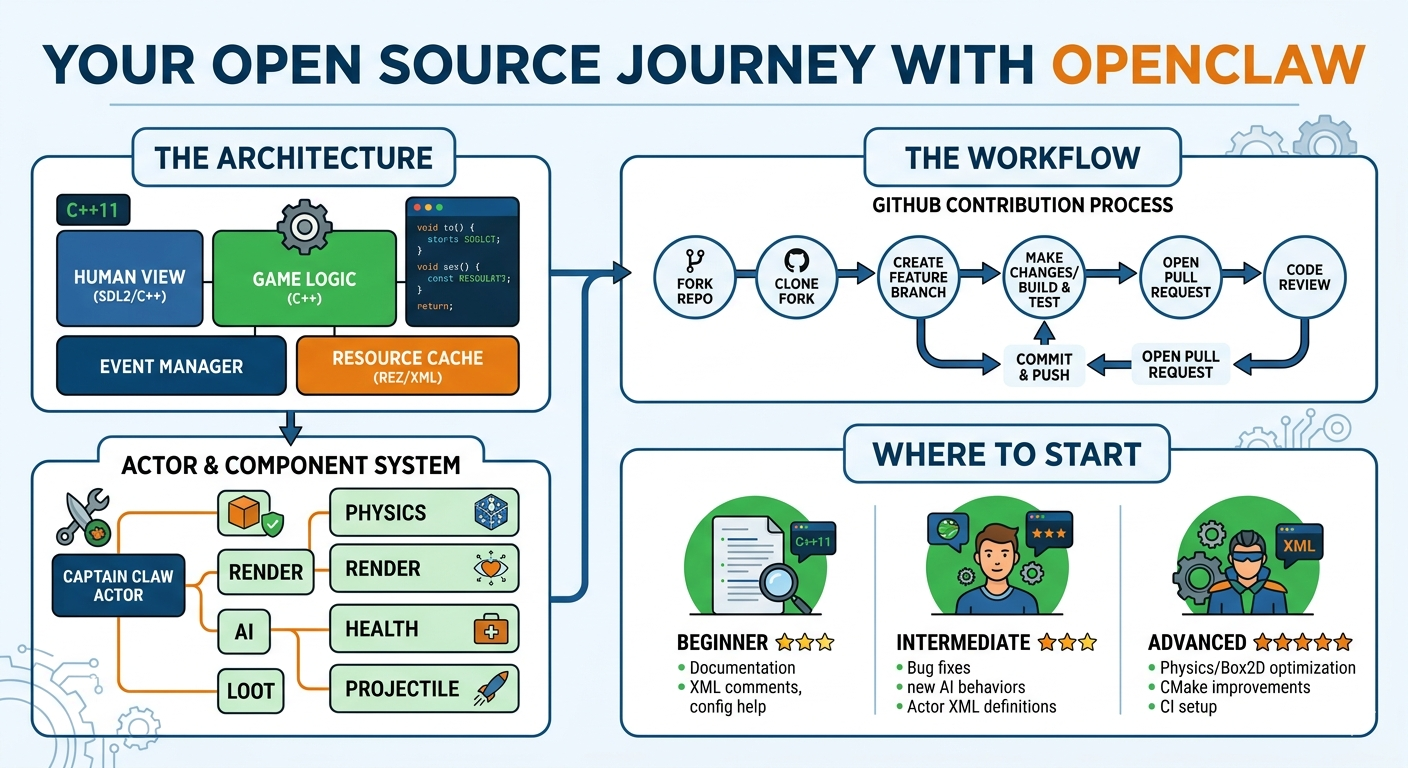
Before contributing, you need to understand how the project is structured. OpenClaw uses a component-based actor system, which is the same pattern used by major engines like Unity and Unreal.
Core architectural layers
┌─────────────────────────────────┐
│         Human View (SDL2)       │  ← Renders the game, handles input
├─────────────────────────────────┤
│         Game Logic Layer        │  ← Manages actors, physics, events
├─────────────────────────────────┤
│         Event Manager           │  ← Decoupled pub/sub communication
├─────────────────────────────────┤
│         Resource Cache          │  ← Loads and caches assets from .REZ
└─────────────────────────────────┘
Actor and component system
Every object in the game — Captain Claw, an enemy, a treasure chest, a projectile — is an Actor. Actors are composed of Components that define their behaviour. This follows the composition over inheritance principle.
Key components include:
PositionComponent— where the actor is in the worldPhysicsComponent— Box2D body, collision shape, and forcesRenderComponent— sprite or animation to drawAnimationComponent— manages animation state transitionsHealthComponent— hit points and death logicAIComponent— enemy patrol, chase, and attack behaviourCollisionComponent— defines what happens on contactLootComponent— what drops when an enemy diesProjectileComponent— movement and lifetime of bullets/magic
Actors and their components are defined in XML files under Assets/Actors/. The ActorFactory reads these XML definitions at runtime and assembles the actor. This means many changes to gameplay do not require touching C++ at all.
Key source directories
OpenClaw/
├── CaptainClaw/
│   ├── Engine/
│   │   ├── Actor/              ← Actor and component base classes
│   │   ├── ActorComponent/     ← All component implementations
│   │   ├── Physics/            ← Box2D integration
│   │   ├── Events/             ← Event types and EventManager
│   │   ├── ResourceCache/      ← Asset loading from .REZ archive
│   │   └── GameApp/            ← Application loop and human view
├── Assets/
│   ├── Actors/                 ← XML actor definitions
│   ├── Levels/                 ← XML level data
│   └── Sounds/                 ← Audio assets
└── config.xml                  ← Runtime configuration
Setting Up the Project
Prerequisites
Install the following before cloning:
Linux (Ubuntu/Debian):
bash
sudo apt-get install \
  libsdl2-dev libsdl2-image-dev \
  libsdl2-mixer-dev libsdl2-ttf-dev \
  libbox2d-dev cmake g++
Windows: Download prebuilt SDL2 and Box2D development libraries and configure CMake to point at them. MinGW or MSVC both work.
Clone and build
bash
git clone https://github.com/pjasicek/OpenClaw.git
cd OpenClaw
mkdir build && cd build
cmake ..
make -j$(nproc)
Asset requirement
OpenClaw does not include game assets. You must legally own Captain Claw (available on GOG.com) and place the CLAW.REZ file in the assets directory as specified in the README. The engine reads all graphics, audio, and level data from this archive.
The Open Source Workflow
Contributing to any open source project follows a standard Git-based workflow. Here is the full process from start to finish.
Step 1 — Fork the repository
On GitHub, click Fork on the OpenClaw repository page. This creates your own copy at github.com/YOUR_USERNAME/OpenClaw.
Step 2 — Clone your fork
bash
git clone https://github.com/YOUR_USERNAME/OpenClaw.git
cd OpenClaw
git remote add upstream https://github.com/pjasicek/OpenClaw.git
Adding upstream lets you pull in changes from the original repository later.
Step 3 — Create a feature branch
Never commit directly to master. Always create a branch named after the work you are doing:
bash
git checkout -b fix/enemy-patrol-boundaryUse prefixes like fix/, feature/, or docs/ to communicate intent.
Step 4 — Make your changes
Make focused changes. One branch = one logical change. Do not bundle unrelated fixes together.
Step 5 — Build and test
Always build the project after your changes and play through the affected area:
bash
cd build
make -j$(nproc)
./CaptainClaw
Test edge cases — what happens at level boundaries, with low health, with multiple enemies present?
Step 6 — Commit with a clear message
bash
git add .
git commit -m "Fix enemy patrol reversing outside tile boundary"
A good commit message answers: what changed, and why. Avoid vague messages like “fix bug” or “update code”.
Step 7 — Push and open a Pull Request
bash
git push origin fix/enemy-patrol-boundaryThen go to GitHub, navigate to your fork, and click Compare & pull request. Write a description explaining what you changed, why, and how to test it.
Step 8 — Respond to review
The maintainer may request changes. Update your branch, push again, and the PR updates automatically. Be open to feedback — code review is a professional skill.
Where to Start: Good First Contributions
Finding the right first task is important. Here are areas in OpenClaw suitable for students at different levels.
Beginner — Documentation and XML
- Improve or expand the README with clearer build instructions
- Add comments to undocumented XML actor files in
Assets/Actors/ - Fix typos or inconsistencies in configuration files
- Document what each
config.xmloption does
Why it matters: Good documentation is a genuine contribution. Many open source projects are hurt by poor docs far more than by missing features.
Intermediate — Bug fixes
- Find a reproducible bug, open an Issue describing it with steps to reproduce, then fix it
- Look through the GitHub Issues list for anything labelled
bugorhelp wanted - Common areas: enemy AI edge cases, collision detection near tile edges, animation state transitions
Approach: Read the relevant component’s source file, add debug logging if needed, isolate the cause, fix it minimally, and test thoroughly.
Intermediate — New actor component or enemy behaviour
- Study an existing simple component (e.g.,
HealthComponent) - Create a new component following the same pattern
- Define it in XML and attach it to an actor definition
- Test in-game
Advanced — Physics and Box2D integration
- Improve physics behaviour for edge cases (slopes, moving platforms)
- Optimise collision filtering in
PhysicsComponent - Study how Box2D contact listeners are used in
ClawPhysics.cpp
Advanced — Cross-platform build improvements
- Improve the CMake configuration for better Windows support
- Add CI (continuous integration) configuration using GitHub Actions
- This requires knowledge of CMake, build systems, and shell scripting
Key Concepts You Will Learn
By contributing to OpenClaw you will gain practical experience in the following areas:
Design patterns in use
- Component pattern — actor composition
- Observer / Event pattern — decoupled game event system
- Factory pattern —
ActorFactorycreating actors from XML - Resource manager pattern —
ResCacheloading and caching assets - Command pattern — input handling
C++ skills developed
- Working with raw and smart pointers (
std::shared_ptr,std::weak_ptr) - Virtual functions and polymorphism across component hierarchies
- STL containers (
std::map,std::vector,std::list) in a real system - Reading and writing XML with TinyXML2
- Integrating a third-party physics library (Box2D)
Software engineering practices
- Reading an unfamiliar codebase systematically
- Writing descriptive commit messages
- Participating in code review
- Maintaining backward compatibility when adding features
- Debugging a running application
Tips for University Students
Read before you write. Spend at least a few days reading the codebase before touching it. Use a code editor with a good “go to definition” feature (VS Code with the C++ extension works well).
Start with issues. Check the GitHub Issues tab. Maintainers often label good starter tasks. If no labels exist, read through open issues and find one you understand.
Ask questions publicly. Open a GitHub Issue or comment on an existing one. Other contributors and the maintainer can help. Asking questions publicly also helps future contributors who have the same question.
Keep pull requests small. A focused, well-explained PR with 50 lines changed is far more likely to be merged than a large one with 500 lines. Small PRs are easier to review.
Reference your university work. If a change you make relates to something from your coursework — a data structure, an algorithm, a design pattern — say so in the PR description. It demonstrates applied understanding.
Add it to your CV. A merged pull request to a real open source project is a concrete, verifiable achievement. Link to it directly on your CV or LinkedIn profile.
Useful Resources
| Resource | Link |
|---|---|
| OpenClaw repository | https://github.com/pjasicek/OpenClaw |
| Captain Claw (GOG) | https://www.gog.com/game/claw |
| SDL2 documentation | https://wiki.libsdl.org |
| Box2D manual | https://box2d.org/documentation |
| Pro Git book (free) | https://git-scm.com/book/en/v2 |
| First Contributions guide | https://firstcontributions.github.io |
| Open Source Guide | https://opensource.guide/how-to-contribute |
Conclusion
OpenClaw is more than a game — it is a well-structured C++ project covering physics, event systems, resource management, and component-based design. For university students, it offers a rare opportunity: a codebase that is complex enough to be educational but focused enough to be approachable.
Your first contribution does not need to be impressive. It needs to be correct, well-explained, and genuine. Start small, learn the workflow, and build from there. The skills you develop — reading unfamiliar code, collaborating asynchronously, writing clearly about technical work — are exactly what employers look for in junior developers.
Open source is how the software world shares knowledge. OpenClaw is a good place to start participating in it.