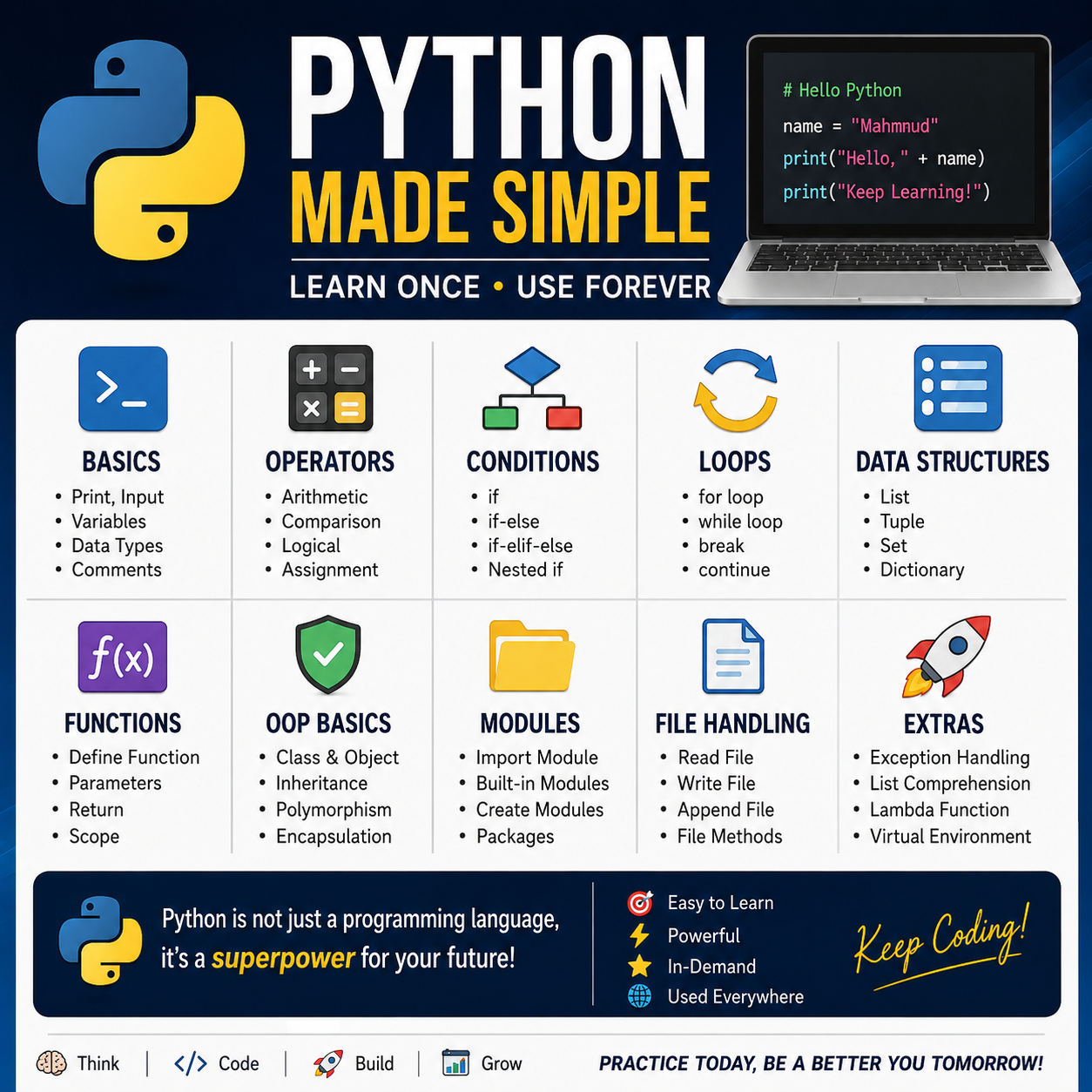
Python is one of the easiest and most popular programming languages. It is widely used for web development, data science, AI, machine learning, automation, scripting, and software development.
1. Installing Python
Download and install Python from:
During installation on Windows, select:
Add Python to PATH
Check the installation:
python --version
Or:
python3 --version
2. Your First Python Program
print("Hello, World!")
Output:
Hello, World!
print() displays information on the screen.
More examples
print("Welcome to Python")print(10)print(5+10)
Output:
Welcome to Python1015
3. Python Comments
Comments help explain your code.
Single-line comment
# This is a commentprint("Hello")
Multi-line comment
"""This is amulti-line comment"""print("Python")
4. Variables
Variables store data.
name="Mahmud"age=38salary=50000
Use variables:
name="Mahmud"print(name)
Output:
Mahmud
Multiple variables
name, age, country="Mahmud", 38, "Bangladesh"print(name)print(age)print(country)
5. Data Types
Python has several important data types.
name="Mahmud"# strage=38# intprice=99.99# floatis_active=True# bool
Check a variable’s type:
name="Mahmud"print(type(name))
Output:
<class 'str'>
Main Python data types
| Data Type | Example |
|---|---|
str | "Hello" |
int | 10 |
float | 10.5 |
bool | True, False |
list | [1, 2, 3] |
tuple | (1, 2, 3) |
set | {1, 2, 3} |
dict | {"name": "Mahmud"} |
NoneType | None |
6. Strings
A string is text.
message="Hello Python"
String operations
name="Mahmud"print(name.upper())print(name.lower())print(len(name))
Output:
MAHMUDmahmud6
Combining strings
first_name="Mahmud"last_name="Hasan"full_name=first_name+" "+last_nameprint(full_name)
f-Strings
This is the recommended modern approach:
name="Mahmud"age=38print(f"My name is {name} and I am {age} years old.")
7. User Input
Use input() to receive information from a user.
name=input("Enter your name: ")print(f"Hello, {name}")
Input is normally a string
age=input("Enter your age: ")print(type(age))
To convert it to an integer:
age=int(input("Enter your age: "))print(age+5)
8. Type Conversion
Convert one data type to another.
number="100"number=int(number)print(number+50)
Other conversions:
x=int("10")y=float("10.5")z=str(100)a=bool(1)
9. Operators
Arithmetic Operators
a=10b=3print(a+b) # Additionprint(a-b) # Subtractionprint(a*b) # Multiplicationprint(a/b) # Divisionprint(a//b) # Floor divisionprint(a%b) # Modulusprint(a**b) # Power
Output:
137303.3333333333333335311000
Comparison Operators
print(10==10)print(10!=5)print(10>5)print(10<5)print(10>=10)print(10<=5)
Logical Operators
age=25print(age>18andage<60)print(age<18orage>60)print(notage>18)
10. Conditional Statements
if
age=20ifage>=18:print("You are an adult")
if-else
age=16ifage>=18:print("Adult")else:print("Minor")
if-elif-else
marks=75ifmarks>=80:print("Grade A")elifmarks>=70:print("Grade B")elifmarks>=60:print("Grade C")else:print("Failed")
Important: Indentation
Python uses indentation to define code blocks:
ifTrue:print("This belongs to the if block")print("This is outside the if block")
11. Loops
for Loop
foriinrange(5):print(i)
Output:
01234
Different uses of range()
foriinrange(1, 6):print(i)
Output:
12345
Step size:
foriinrange(0, 10, 2):print(i)
Output:
02468
while Loop
count=1whilecount<=5:print(count)count+=1
Output:
12345
12. break and continue
break
Stops a loop completely.
foriinrange(10):ifi==5:breakprint(i)
Output:
01234
continue
Skips the current iteration.
foriinrange(5):ifi==2:continueprint(i)
Output:
0134
13. Lists
Lists store multiple values.
fruits= ["Apple", "Banana", "Mango"]
Access elements:
print(fruits[0])
Output:
Apple
Add items
fruits.append("Orange")
Remove items
fruits.remove("Banana")
Change items
fruits[0] ="Grape"
Loop through a list
forfruitinfruits:print(fruit)
14. List Indexing and Slicing
numbers= [10, 20, 30, 40, 50]
Indexing:
print(numbers[0]) # 10print(numbers[-1]) # 50
Slicing:
print(numbers[1:4])
Output:
[20, 30, 40]
15. Tuples
Tuples are similar to lists, but they are generally immutable.
colors= ("Red", "Green", "Blue")print(colors[0])
You cannot normally do this:
colors[0] ="Yellow"
Because tuples cannot be modified after creation.
16. Sets
Sets store unique values.
numbers= {1, 2, 3, 3, 4, 4, 5}print(numbers)
Possible output:
{1, 2, 3, 4, 5}
Add an item:
numbers.add(6)
Remove an item:
numbers.remove(3)
Useful for removing duplicates:
items= [1, 2, 2, 3, 3, 4]unique_items=set(items)print(unique_items)
17. Dictionaries
Dictionaries store data as key-value pairs.
person= {"name": "Mahmud","age": 38,"country": "Bangladesh"}
Access values:
print(person["name"])
Output:
Mahmud
Add or update:
person["email"] ="mahmud@example.com"person["age"] =39
Loop through a dictionary:
forkey, valueinperson.items():print(key, value)
18. Functions
Functions allow you to reuse code.
defgreet():print("Hello!")
Call the function:
greet()
Function with parameters
defgreet(name):print(f"Hello, {name}")greet("Mahmud")
Function with return value
defadd(a, b):returna+bresult=add(10, 20)print(result)
Output:
30
Default parameter
defgreet(name="Guest"):print(f"Hello, {name}")greet()greet("Mahmud")
19. Scope
A variable created inside a function is usually local.
deftest():x=10print(x)test()
This will cause an error:
deftest():x=10test()print(x)
Because x exists only inside the function.
20. Exception Handling
Errors can be handled using try and except.
try:number=int(input("Enter a number: "))print(number)exceptValueError:print("Please enter a valid number")
Finally
try:result=10/2exceptZeroDivisionError:print("Cannot divide by zero")finally:print("Program finished")
21. Classes and Objects – Basic OOP
Python supports Object-Oriented Programming.
classPerson:def__init__(self, name, age):self.name =nameself.age =agedefintroduce(self):print(f"My name is {self.name} and I am {self.age}")
Create an object:
person1=Person("Mahmud", 38)person1.introduce()
Output:
My name is Mahmud and I am 38
22. Inheritance
One class can inherit from another.
classAnimal:defspeak(self):print("Animal makes a sound")classDog(Animal):defbark(self):print("Dog barks")
Use it:
dog=Dog()dog.speak()dog.bark()
23. Modules
Python code can be organized into modules.
For example, create a file called:
calculator.py
Contents:
defadd(a, b):returna+b
Then in another Python file:
importcalculatorprint(calculator.add(10, 20))
24. Useful Built-in Modules
math
importmathprint(math.sqrt(16))print(math.pi)
random
importrandomprint(random.randint(1, 10))
datetime
fromdatetimeimportdatetimenow=datetime.now()print(now)
25. File Handling
Write to a file
withopen("test.txt", "w") asfile:file.write("Hello Python")
Read a file
withopen("test.txt", "r") asfile:content=file.read()print(content)
Append to a file
withopen("test.txt", "a") asfile:file.write("\nNew line added")
The with statement automatically closes the file.
26. List Comprehension
A concise way to create lists.
Traditional method:
numbers= []foriinrange(1, 6):numbers.append(i*2)print(numbers)
Using list comprehension:
numbers= [i*2foriinrange(1, 6)]print(numbers)
Output:
[2, 4, 6, 8, 10]
With a condition:
even_numbers= [iforiinrange(10) ifi%2==0]print(even_numbers)
27. Lambda Functions
A small anonymous function.
square=lambdax: x*xprint(square(5))
Output:
25
Another example:
add=lambdaa, b: a+bprint(add(10, 20))
28. Basic Python Packages
Python packages are commonly installed using pip.
pip install pandas
Examples:
pip install numpypip install pandaspip install matplotlibpip install requests
Then:
importpandasaspd
29. Virtual Environment
For projects, create a virtual environment:
python -m venv myenv
Activate it on Windows:
myenv\Scripts\activate
Then install packages:
pip install pandas
Deactivate:
deactivate
30. A Complete Beginner Example
Here is a simple student grade program:
name=input("Enter student name: ")marks=float(input("Enter marks: "))ifmarks>=80:grade="A+"elifmarks>=70:grade="A"elifmarks>=60:grade="A-"elifmarks>=50:grade="B"else:grade="Fail"print(f"\nStudent: {name}")print(f"Marks: {marks}")print(f"Grade: {grade}")
Recommended Learning Order
Learn Python in this sequence:
- Python syntax and
print() - Variables and data types
- Strings
- Operators
- Input and type conversion
if,elif, andelse- Loops
- Lists, tuples, sets, and dictionaries
- Functions
- Exception handling
- Files
- OOP: classes and objects
- Modules and packages
- Virtual environments
- Advanced Python
- Projects
Best practice
After learning each topic, write at least 5–10 small programs. For example:
- Calculator
- Number guessing game
- Even/odd checker
- Student grade calculator
- To-do list
- Password generator
- Contact management system
- File reader
- Simple web scraper
- Data analysis project